> ## Documentation Index
> Fetch the complete documentation index at: https://docs.paygentic.io/llms.txt
> Use this file to discover all available pages before exploring further.
# Fees
> Add fixed charges to your pricing
Fees are fixed charges that complement usage-based billing. Use them for setup costs, platform access, recurring subscriptions, or any charge that doesn't vary with consumption.
## Fees vs. billable metrics
Choose the right tool for the job:
| | Fees | Billable Metrics |
| --------------- | ------------------------- | ----------------------- |
| **Charge type** | Fixed amount | Variable by usage |
| **When to use** | Predictable costs | Consumption-based |
| **Examples** | Setup fees, subscriptions | Tokens, compute hours |
| **Pricing** | Single unit price | Multiple pricing models |
**Use fees for:**
* One-time setup or onboarding charges
* Monthly or annual platform fees
* License fees
* Support tier charges
**Use billable metrics for:**
* Token consumption
* Compute hours
* Storage usage
* Any metered resource
## Fee types
### One-time fees
Charged once when a subscription activates. Perfect for:
* **Setup fees** - Cover onboarding costs
* **Implementation charges** - Custom integrations
* **Activation fees** - Initial account setup
One-time fees appear on the customer's first invoice only.
### Recurring fees
Charged on a schedule throughout the subscription. Options include:
| Cadence | Use Case |
| ----------- | ------------------ |
| **Monthly** | SaaS subscriptions |
| **Yearly** | Annual licenses |
Recurring fees are charged when the subscription starts and then on each billing cycle.
## Payment terms
Control when customers pay for fees.
### Prepaid (in advance)
The customer's wallet balance is debited right away. As a merchant you receive the fees instantly.
**Best for:**
* Risk management
* Smaller customers
* Self-serve signups
### Postpaid (in arrears)
Charges accumulate and appear on the next invoice. No immediate payment required.
**Best for:**
* Enterprise contracts
* Established customers
* Sales-led deals
## Creating fees
Fees belong to a product. Create them in the Paygentic dashboard or via API.
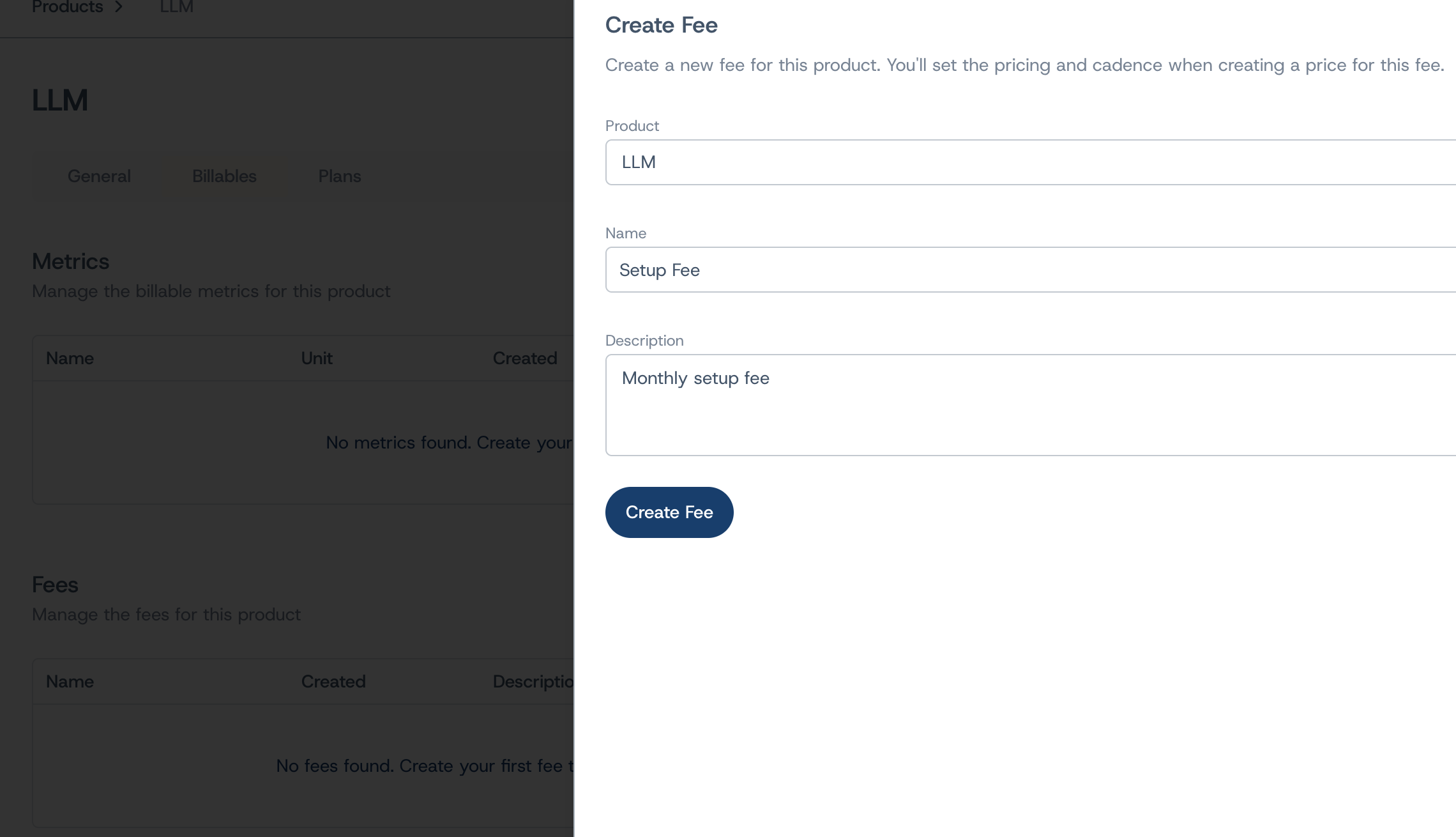 ### Required fields
* **Name** - Internal identifier (e.g., "Pro Monthly Fee")
* **Description** - Explain what this fee covers
* **Product** - Which product this fee belongs to
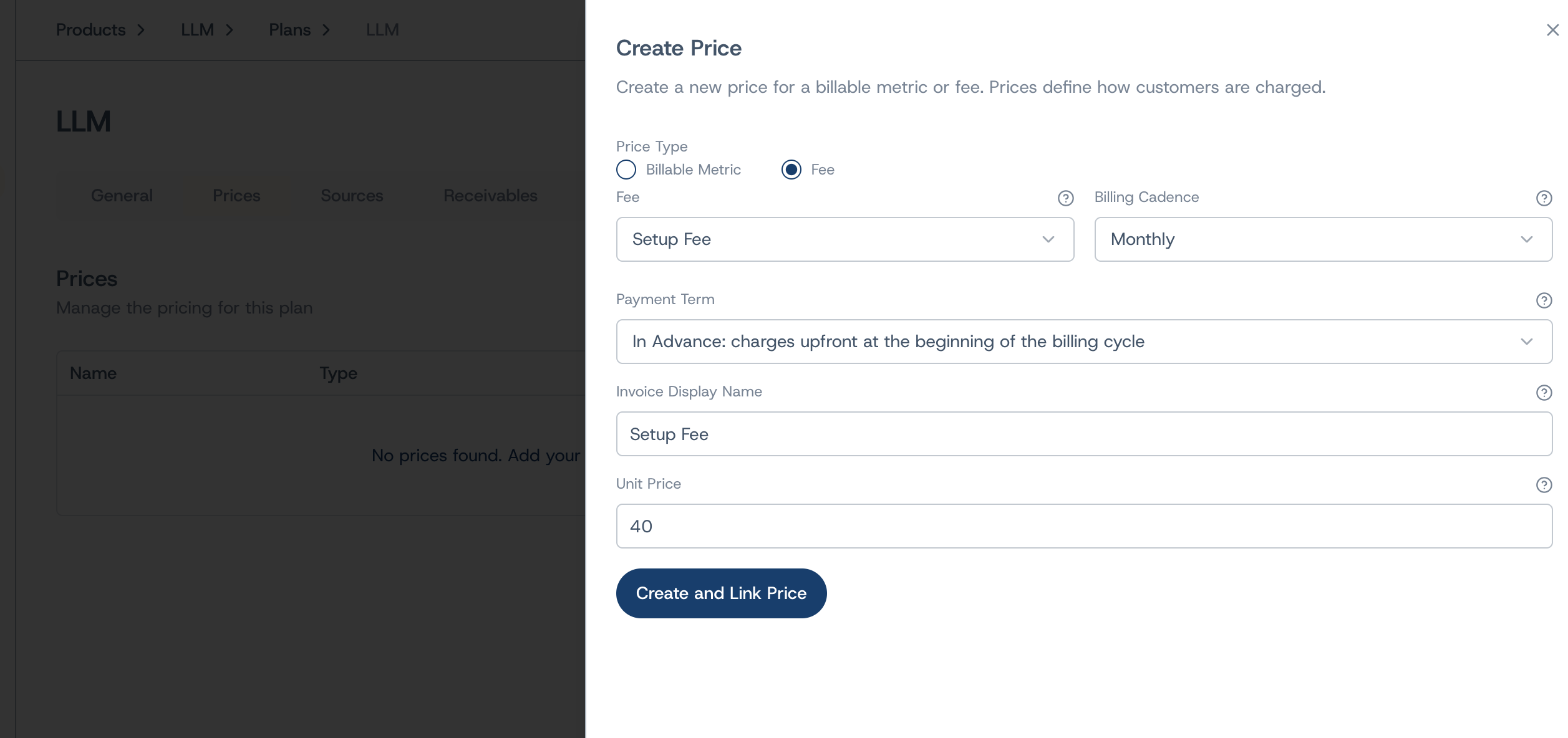
### Pricing configuration
When adding a fee to a plan, configure:
* **Unit Price** - The fixed amount to charge (e.g., \$50.00)
* **Billing Cadence** - How often to charge (one-time, monthly, yearly, etc.)
* **Payment Term** - When to collect (prepaid or postpaid)
* **Invoice Display Name** - What customers see on invoices
### Required fields
* **Name** - Internal identifier (e.g., "Pro Monthly Fee")
* **Description** - Explain what this fee covers
* **Product** - Which product this fee belongs to
### Pricing configuration
When adding a fee to a plan, configure:
* **Unit Price** - The fixed amount to charge (e.g., \$50.00)
* **Billing Cadence** - How often to charge (one-time, monthly, yearly, etc.)
* **Payment Term** - When to collect (prepaid or postpaid)
* **Invoice Display Name** - What customers see on invoices
 ## Adding fees to plans
Fees are attached to plans alongside metric prices. A single plan can include:
* Multiple fees (setup + monthly subscription)
* Fees and usage-based metrics together
* Different payment terms per fee
**Example: SaaS Platform Plan**
| Charge | Type | Cadence | Payment |
| --------------- | ------ | -------- | -------- |
| Setup Fee | Fee | One-time | Prepaid |
| Platform Access | Fee | Monthly | Postpaid |
| API Calls | Metric | Usage | Postpaid |
| Premium Support | Fee | Monthly | Postpaid |
## Fees on invoices
Fees appear as line items on customer invoices with:
* The display name you configured
* The charge amount
* Applicable taxes (calculated automatically)
## API reference
Manage fees programmatically:
* `POST /v0/fees` - Create a new fee
* `GET /v0/fees` - List all fees
* `GET /v0/fees/{id}` - Get fee details
* `PATCH /v0/fees/{id}` - Update fee name/description
See the [API Reference](/api-reference) for complete documentation.
## Next steps
* [Create plans](/platform/pricing/plans) to bundle fees with usage pricing
* [Set up products](/platform/pricing/products) to organize your offerings
* [Configure prices](/platform/pricing/prices) for usage-based metrics
## Adding fees to plans
Fees are attached to plans alongside metric prices. A single plan can include:
* Multiple fees (setup + monthly subscription)
* Fees and usage-based metrics together
* Different payment terms per fee
**Example: SaaS Platform Plan**
| Charge | Type | Cadence | Payment |
| --------------- | ------ | -------- | -------- |
| Setup Fee | Fee | One-time | Prepaid |
| Platform Access | Fee | Monthly | Postpaid |
| API Calls | Metric | Usage | Postpaid |
| Premium Support | Fee | Monthly | Postpaid |
## Fees on invoices
Fees appear as line items on customer invoices with:
* The display name you configured
* The charge amount
* Applicable taxes (calculated automatically)
## API reference
Manage fees programmatically:
* `POST /v0/fees` - Create a new fee
* `GET /v0/fees` - List all fees
* `GET /v0/fees/{id}` - Get fee details
* `PATCH /v0/fees/{id}` - Update fee name/description
See the [API Reference](/api-reference) for complete documentation.
## Next steps
* [Create plans](/platform/pricing/plans) to bundle fees with usage pricing
* [Set up products](/platform/pricing/products) to organize your offerings
* [Configure prices](/platform/pricing/prices) for usage-based metrics